I created an image classifier for pneumonia. The gist for the same is here. Feedback would be highly appreciated.
On Catastrophic Forgetting:
I see lot of people have deployed their work as web app. I also remembered in the lesson video, someone asked if it’s possible to collect feedback from user such that the model can improve. Anyone has done this? I recently read this “online” learning, or learning from less common sample, can lead to something called “Catastrophic Forgetting”. Not sure if @jeremy ever discussed in the MOOC.
I tried beam search (in current fastai master, 1.043) on Dave Smith’s Deep Elon (tweets generator) and posted a simple kernel on Kaggle: https://www.kaggle.com/abedkhooli/textgen-143
It needs some parameter tuning and may work better on guru tweets than Elon’s (Dave’s dataset is on github so was easy to test).
After Lesson 1, I built an old vs new Mini (the classic little British car) classifier. I’m British, and who doesn’t love Minis?
18|461x420
Anyway, I have a background in machine learning, and have built models using Keras and Tensorflow. I was astonished to find that the model built using the techniques from Lession 1 had almost perfect accuracy on the validation set. In fact, when I looked at the confusion matrix, and then at the only two pictures it was misclassifying, I found that it wasn’t getting one of them wrong at all! If you look at the picture (and the positioning of the petrol caps) the two Minis in the picture are in fact one of each: an old and a new!
57|303x304
Amazing!
Hi Gavin,
You wouldn’t be the first one to submit only ones (1) and zeros (0) to this competition. You should submit the probabilities (0.98765 for example). Check if this brings your validation score closer to the Kaggle score, if not already implemented.
I’m struggling myself to improve from approximately 0.975 on Kaggle to anything better. In the validation set I can reach 0.99 accuracy on the full dataset. Maybe I’m overfitting, although my validation loss is still lower than the training loss 
1 Like
Thanks @sinsji! I used the predictions instead of the class and got up to 96.18 
That’s great. I am stuck at 95.25 and my validation set accuracy is way better than this. Looks like i need to generalize my model further
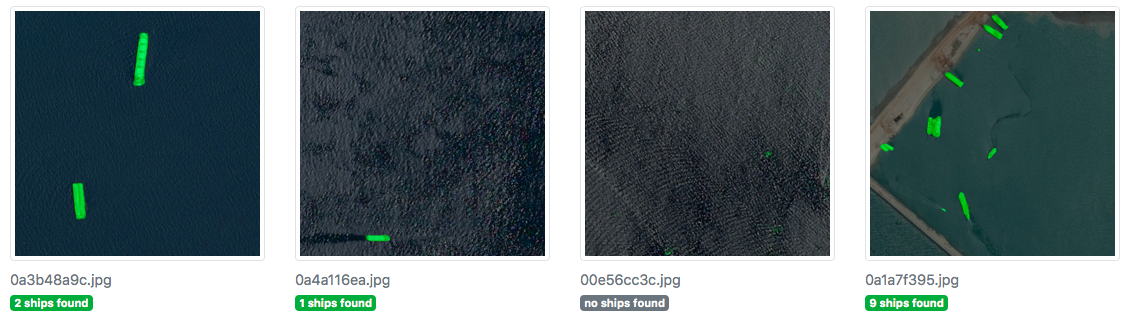
After watching the third lesson I tried to challenge myself and go through a Kaggle challenge on image segmentation, in particular, ship detection from space. I’ve used some best practices for working with large datasets and highly unbalanced data to achieve 0.91+ dice with 256-sized images. Take a look!
Ps. There is also a Docker image which can be deployed for (fun) inference.
The repo is here.
8 Likes
Created a classifier which will classify popular indian cars. I have used google_images_download which helped me in downloading approximately 100 images per category of images.
More about this project can be found at my github repo.
Please let me know your comments and feedbacks. Thanks to @arunoda for his amazing blog on creating a dataset for cars which helped me a lot in collecting the dataset for this project.
For my own work, I need to work with images of 4 or more channels, not just the standard 3 RBG channels. As far as I know, both @ste and @wdhorton have shared implementations of 4-channel images for the Human Protein Atlas Kaggle competition. However, none of their code works for images of 5 or more channels because they rely on fastai.vision.Image. Here, I have implemented a way to use images of any number of channels, as well as custom ways to visualize them.
The notebook doesn’t solve any real problem, it just showcases the implementation. I figured it’d be helpful to other folks that have images of 5+ channels in their own projects.
4 Likes
Hi Stefano,
Thanks. I didn’t realize that.
Solved 4-rotation without reflect:
tfm = [rotate(degrees=0, p=0.25), rotate(degrees=90, p=0.25), rotate(degrees=180, p=0.25), rotate(degrees=270, p=0.25)]
1 Like
General Feedback:
I have read a few post saying that training loss is higher than validation loss. One thing that needs clarification: Is the data augmentation (that get_transforms()) apply to train data set, and not to validation data set. I don’t remember this being discussed in the lesson, but i think general practice is you don’t apply data aug to validation set.
So if you have very strong data augmentation, this will lead to a tougher training set, and your network may have harder time to predict. Your validation set stays at the same difficulty, and so can score better in the loss than the train set.
It will be interesting if you try to vary the amount of data augmentation, and monitor the train loss again.
Hello fellows,
I am sharing my first work on the forums. I have created a classifier to identify which city a skyline belongs to. I used google images to train ResNet 34 model on New York, Chicago, Dubai and Hong Kong’s skyline and got close to 86% accuracy. I am sharing the link the to website here
https://skyline-classifier-z904.onrender.com](https://skyline-classifier-z904.onrender.com/
Hi All!
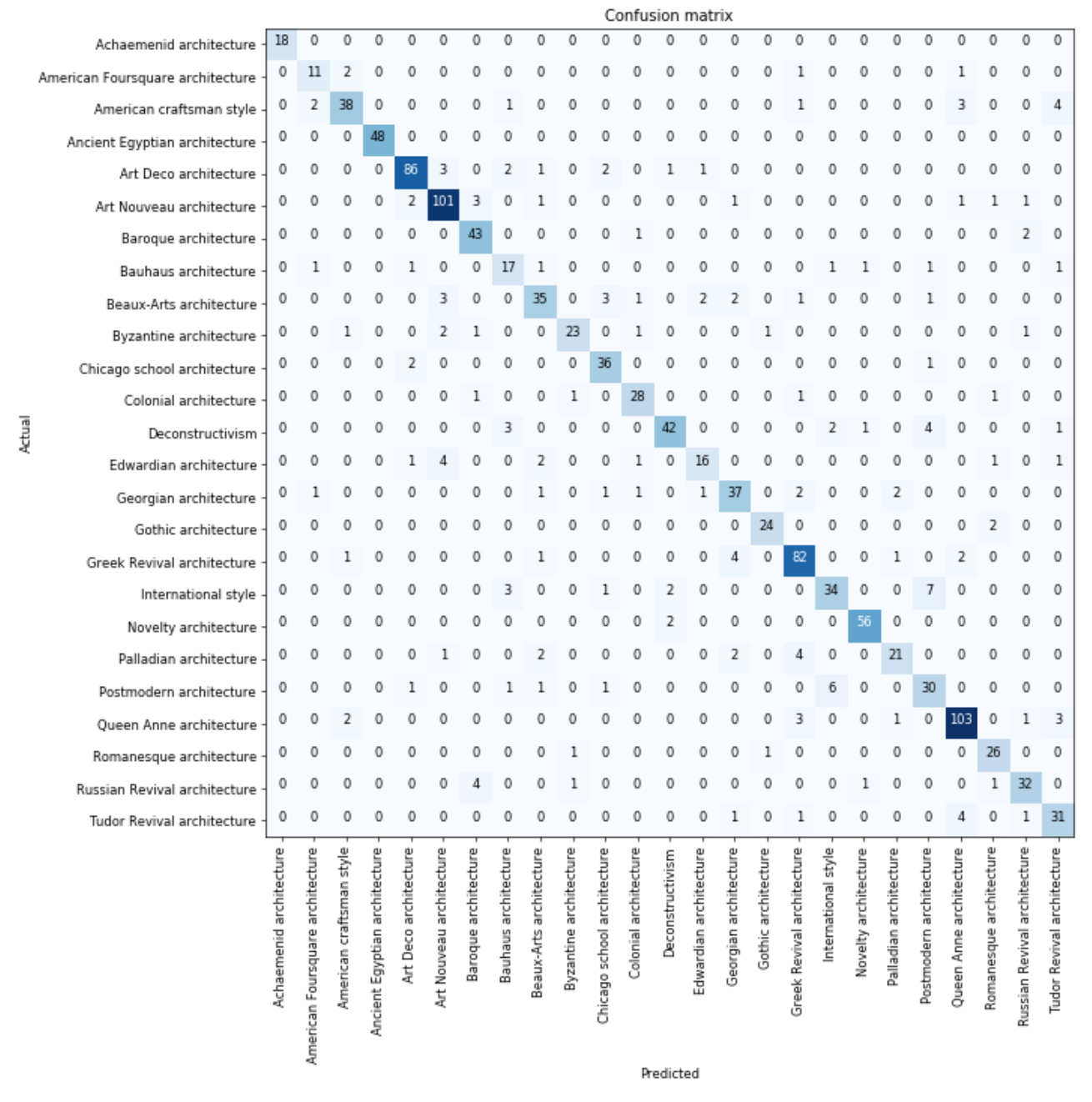
I downloaded an architecture dataset to see if I could classify different styles of architecture. There are 25 types across 5k images in the dataset, originally scrapped from wikimedia.
I’m excited to see my error rate is far below the original 2014 paper’s classification rate of ~47% accuracy when using all 25 classes. Surprisingly mine is around 85%!
Here’s the confusion matrix:
And top losses:
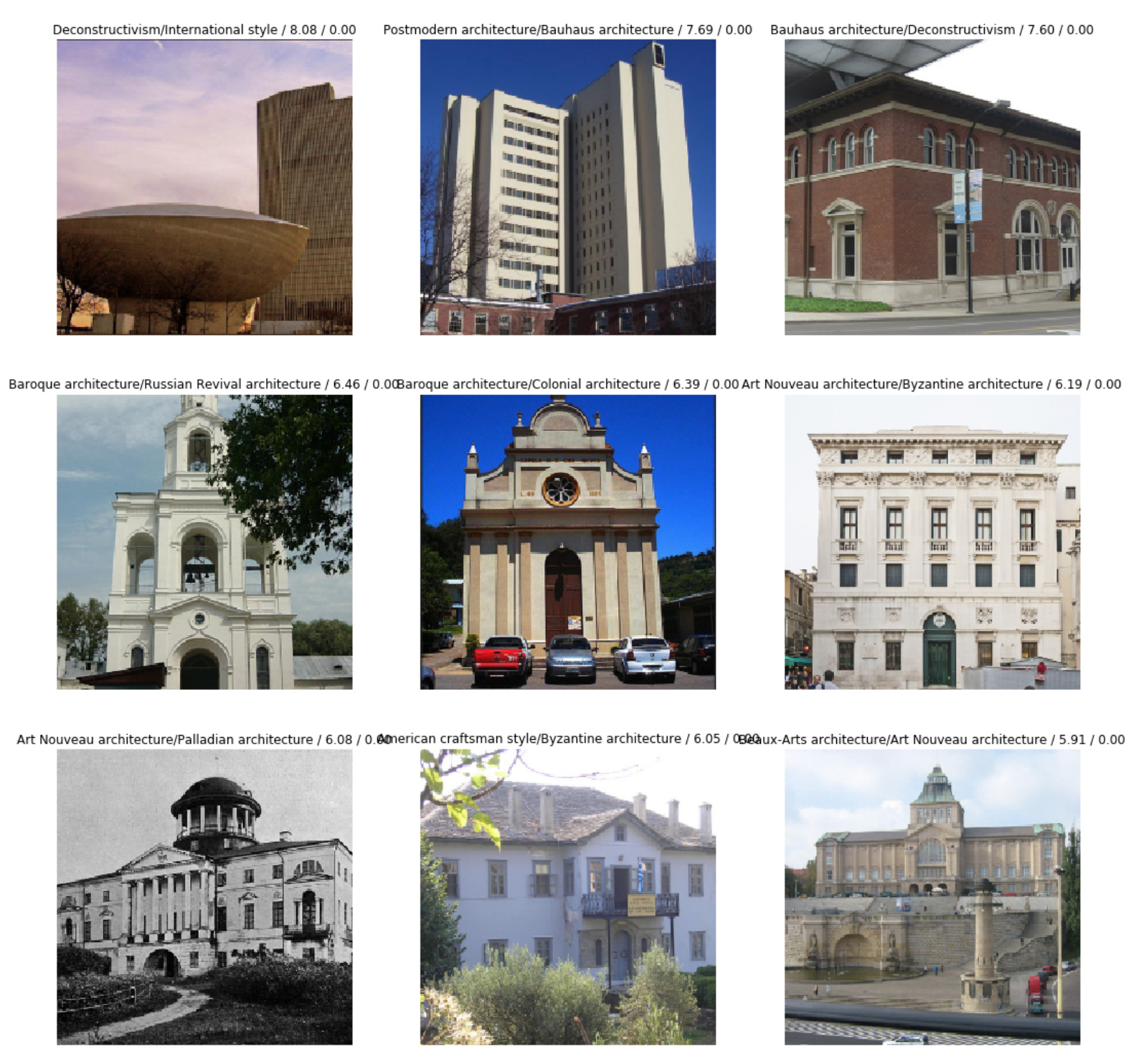
I’d like to do a visualization of what features are most indicative of art nouveau. I’ve seen a few inspections of activations based on PCA but that doesn’t highlight the areas of a picture or show the activation of the layer. Can anyone point me in the right direction?
Hi I M Facing hard time in deploying my model to web.Can anyone please help me.I waned to use free one-Heroku
Hi All,
I had the chance to interview another fellow student of ours. You might recognise him as the creator of DeOldify: DeOldify uses Deep Learning to colorize old B&W images. Jason Antic: @jsa169
Link to the interview
6 Likes
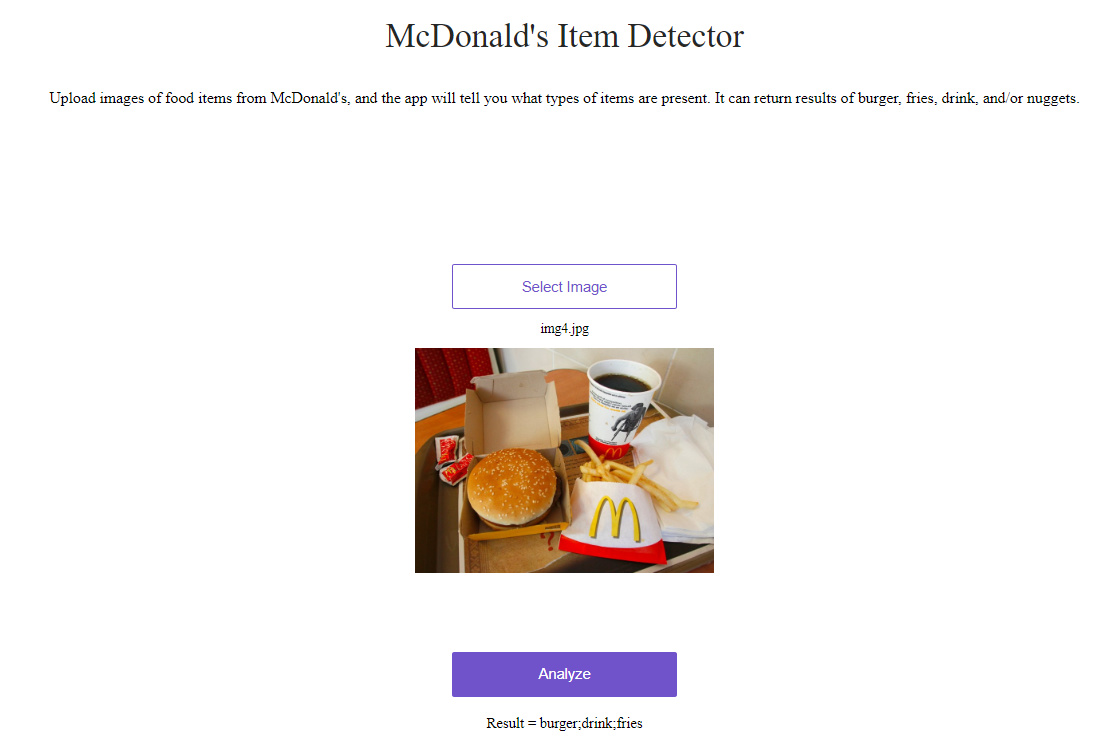
After lesson 3, I created a multi-label image classifier that detects McDonald’s food items. It’s available at https://mcdonalds-item-detector.onrender.com/. You input a picture of a McDonald’s meal, and it tells you whether any ‘burger’, ‘fries’, ‘drink’, or ‘nuggets’ items are present.
I think food classification is a really interesting area. Some potential applications could include improving food safety for people with allergies, improving the eating experience for people who are blind, and potentially enabling reverse-engineering of recipes.
Technical details:
- I used a resnet34 model, and did some progressive resizing. I started out training with 128 size images, then did some fine-tuning, then trained with 256 size images, then did some more fine-tuning
- I was able to get to ~94% accuracy (with a threshold of 0.2)
- I followed Jeremy’s suggestion in the lecture, and did a lot of playing around with learn.recorder.plot_losses() to see the effects of different learning rates
- Getting the data for this was a pain. I was able to automate the image downloading, but then I created a csv file and had to manually input tags for all of my images. I ended up using only ~150 images because it was so tedious. I definitely have a much greater appreciation for people who put together huge datasets!
- Code for my model is available at GitHub
5 Likes
Hi !
Nice wolf detector ! I like how the Husky wasn’t implemented as a wolf, even though it is certainly the closest dog I know to a wolf ^^
Would you mind sharing how you implemented the uploading of the pic via URL ?
Hi! I wrote a piece on the DeViSE paper which combines word vectors with image classification. If you have any feedback on how to make it more understandable/accessible I would appreciate it. You can find it here:
14 Likes
I agreed the data collection is the most tedious one. Some plausible strategy
-
First collect pic of images with only 1 food item only, and hopefully this reduces the labor of labelling, and trained an single-label classification model.
-
Use this model to make predictions on a greatly expanded set of meal photos (multiple food item). Use sliding window or random cropping on each image, your model may predict different food depending on where that cropping landed.
-
Label the meal photo with all the results from running the model, and you will get multi-labels
So this can bootstrap your data set. The downside is that the model is going to make mistakes and not as good as you doing it manually. So it really depends, if you have massive amount of meal photos, this may worth a try.
I think you can pitch this to McDonald. ;-).
2 Likes