At the moment, all architectures have 3 groups.
I am looking forward to Jeremy’s spreadsheets. I need visual illustration to understand complex concepts. 
1 Like
Thanks so much Jeremy 
Hi @jeremy - I am trying to calculate metrics.log_loss for the iceberg challenge and I got this error:
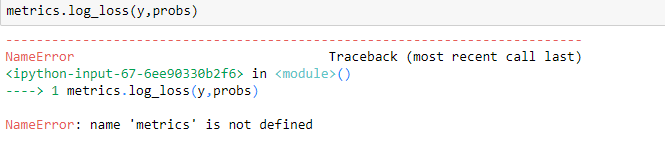
There is a scikit version of metrics log_loss. Is it advisable to use it.
Can you please send a link to your notebook? Maybe github?
from sklearn import metrics
2 Likes
learn.save helps us save the weights that we can load using learn.load… If we do not have very good GPU machine can we run few iterations save weight rerun then load and so on… Or it is just waste of time. Basically I am coming from distributed learning background… where we do lots of compute by leveraging the parallel commodity hardware. Depending on GPU/AWS etc does not seems very cost effective. Especially when we want to move this to next level.
To move to next level you’ll get your own GPU. It costs about $600 for nearly the best GPU you can buy, plus you’ll need a computer to put it in of course! A GPU is about 10x cheaper per floating point operation compared to an Intel CPU.
Hey Jeremy, In the lecture you mentioned that we can save the weight after each cycle in SGD with restarts by passing cycle_save=True. How would we get those weight and average result over them ? Would we have create several models and assign saved weight to them and then manually average result over predictions ? Or is it something fastai library can do for us ?
1 Like
You can use learn.load_cycle - but if you look at the code for that you’ll see it’s a little one-liner. Other than that, it’s up to you to load them each and average over them. I think planet_cv.ipynb may have an example.
1 Like
I got a Windows machine with GPU. I have configured Tensorflow with GPU on the Windows machine. I am not sure if we can test FastAI and PyTorch code on Windows with GPU.
Hi …
Just wanted to know that how can I improve an images quality.??
I tried scaling the image twice but it’s kind of getting blurred…
Can you explain more about what images you want to improve their quality, and why?
It might be wrong thread to discuss, Sorry for that…
Hi Jeremy,
Haven’t updated the post yet with code…(it’s lacking comments and all…)
The images are in single channel…
The input to the network is a low resolution image
The output from the network is a scaled image
For example,
Input dims are 160*240,
Output dims will be 320*480 …( assuming that the Scaling Factor is 2)
Actually I was able to implement this…
That’s why I was asking…
The loss is decreasing but the final image generated is a bit blurred…
Thanks for help.
Hi Jeremy,
I have an use case where I am trying to predict the bounding box of the target along with the classification. Would we be doing any bounding box classification? Any good reading materials on how to go about object localization with bounding boxes?
2 Likes
We did exactly that in lesson 7 last year - have a look at that.
2 Likes
@jeremy it really hits me now what you are saying about this. If the images in the dataset are of varying sized rectangles then it is better to center crop because with a stretched resize the resulting resized images will not have a consistent stretch (some might be stretched more horizontally vs vertically etc.) which makes it probably a lot harder for the neural net to learn/classify… Never really thought about this before, so thanks for the insight!
4 Likes
I pushed some code that should have fixed this.
What is the purpose of dividing us in teams ?
yep now it works, thanks!