Working code for Lesson 1: [Updated 2025/11/25] Is it a bird? | Kaggle
1 Like
Long time Ruby & Common LISP developer, not familiar with debugging python, and I got stumped on the first notebook, pickling error during fine tuning.
     58 def dump(obj, file, protocol=None):
     59     '''Replacement for pickle.dump() using ForkingPickler.'''
---> 60     ForkingPickler(file, protocol).dump(obj)

PicklingError: Can't pickle <function PILBase.__annotate__ at 0x7fc5538835e0>: it's not the same object as fastai.vision.core.PILBase.__annotate__
when serializing dict item '__annotate__'```

Did a lot of searching and don't know where/how to go about fixing this.hey i am here in 2026 starting practical deep learning course
Good evening,
I just started the Deep Learning for Coders with FastAI and PyTorch physical book. For chapter 1 it references a notebook that differentiates between cats and dogs and specifies that the notebook is available on the website (course.fast.ai). The website just redirects me to a notebook that classifies whether a certain image is a bird or not.
Perhaps I’m doing something wrong, but I could not find anything.
Thank you.
Best,
Miguel F.
Hi, I’m a fellow student who also just started learning. This really confused me as well, but after re-reading the book, there was a sidebar stating there are 2 versions of the notebooks. So I looked at the GitHub fastbook repo and there was a clean/ folder where the intro book was cleaned with the cat and dog exercise under the “running your first notebook” section. It seems the tutorial is a little outdated so it was quite confusing. I hope this helps.
I got the same PicklingError on my first try with Python 3.14. I fixed it by downgrading to Python 3.12. Seems like some new feature that isn’t yet handled by fastai caused it.
Hey y’all,
I’d personally prefer posting a new topic titled ‘Lesson 1 on Kaggle Fixes’ as the official notebook appears somewhat broken at the time of writing (April 1st 2026 (no fools)). But as a brand new user, I can only reply to topics, so hopefully this is of help to other newcomers.
For posterity, I’ll post my own mini-fixes for getting things to run on my end. I’ll try to update this as I move forward, perhaps even finish with a clean notebook of my own, but no promises.
1. Replacing duck-duck-go for image retrieval
While duck duck go will - upon repeated runs - yield a necessary image of a bird or forest. However it often fails and seems far too unreliable to download a large enough set to fine tune resnet18 with. Here’s an icrawler based version that’ll setup the data as the notebook needs. You’ll need one codeblock to install the icrawler:
if iskaggle:
    !pip install -Uqq icrawler
and then a second block to define the new function.
from icrawler.builtin import BingImageCrawler
from pathlib import Path
from fastai.vision.all import resize_images
import multiprocessing
import logging
import time

def _crawl_worker(keywords, output_dir, max_images):
    #logging.disable(logging.CRITICAL)  # suppress icrawler logs in subprocess
    crawler = BingImageCrawler(storage={"root_dir": str(output_dir)})
    crawler.crawl(keyword=keywords, max_num=max_images)

def search_images(keywords, max_images=1000, output_dir="images"):
    p = multiprocessing.Process(target=_crawl_worker, args=(keywords, output_dir, max_images))
    p.start()
    try:
        p.join()
    except KeyboardInterrupt:
        p.terminate()
        p.join()
        print(f"Download stopped for '{keywords}'")
You can now download the necessary bird and forest images with this cell:
searches = 'forest', 'bird'
path = Path('bird_or_not')

for o in searches:
    dest = path / o
    dest.mkdir(exist_ok=True, parents=True)
    search_images(f'{o} photo', output_dir=dest)
    time.sleep(5)
    resize_images(path / o, max_size=400, dest=path / o)
Finally, this block will help display a selection of images to ensure they’re downloaded / work / properly labelled:
from pathlib import Path
from fastai.vision.all import *
import random

path = Path('bird_or_not')

images = list(path.glob('**/*.jpg')) + list(path.glob('**/*.png'))
sample = random.sample(images, min(12, len(images)))

fig, axes = plt.subplots(3, 4, figsize=(12, 9))
for ax, img_path in zip(axes.flatten(), sample):
    img = PILImage.create(img_path)
    ax.imshow(img)
    ax.set_title(img_path.parent.name, fontsize=10)
    ax.axis('off')

plt.tight_layout()
plt.show()
2. pytorch and Cuda incompatibility with the GPU P100
By default, my Kaggle environment was set to utilize the GPU P100, which now appears to be so old as to no longer be supported by Kaggle’s default installation of pytorch, yielding this error:
/usr/local/lib/python3.12/dist-packages/torch/cuda/__init__.py:435: UserWarning:
    Found GPU0 Tesla P100-PCIE-16GB which is of cuda capability 6.0.
    Minimum and Maximum cuda capability supported by this version of PyTorch is
    (7.0) - (12.0)
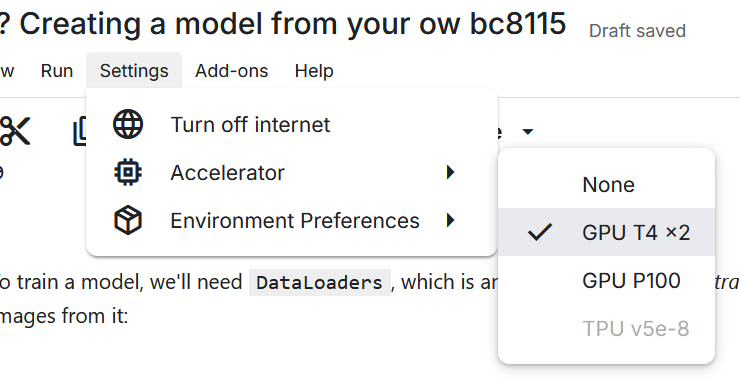
Switching to the ‘GPU T4 x2’ resolves the issue. Do this via Settings → Accelerator:
Cheers,
Gazoo
3 Likes
yes a bit. Plus jeremy surface book 2 I managed to download from here but couldn’t find surface 3
Hey, I tried flower classification model inspired by this on geforce 920mx with CC5.0. It was fun and super slow. I had to tweak lot of stuff but felt good.
Lesson 1 Kaggle workbook not working and giving below warning and then rate limiting errors afterwards. Did anyone face this issue and able to get around it? TIA.
/usr/local/lib/python3.12/dist-packages/jupyter_client/session.py:203: DeprecationWarning: datetime.datetime.utcnow() is deprecated and scheduled for removal in a future version. Use timezone-aware objects to represent datetimes in UTC: datetime.datetime.now(datetime.UTC).
  return datetime.utcnow().replace(tzinfo=utc)
/usr/local/lib/python3.12/dist-packages/jupyter_client/session.py:203: DeprecationWarning: datetime.datetime.utcnow() is deprecated and scheduled for removal in a future version. Use timezone-aware objects to represent datetimes in UTC: datetime.datetime.now(datetime.UTC).
  return datetime.utcnow().replace(tzinfo=utc)
This is just a warning, and datetime is being used internally so we can’t do either. So better to just ignore it.
Hi guys,
I’m working through the first lesson and the error I got from trying to run the code was re: duckduckgo_search module does not exist.
You can fix the error by using the updated package name ddgs as well as module name (also ddgs). The changes below is pasted. duckduckgo-search · PyPI is where I found the change!
!pip install -Uqq ddgs
from ddgs import DDGS #DuckDuckGo has changed the api so we need to update
from fastcore.all import *
def search_images(keywords, max_images=200): return L(DDGS().images(keywords, max_results=max_images)).itemgot(‘image’)
import time, json
2 Likes
Experienced the same error yesterday thanks for this and for my exercise I did classification with 4 images
Regarding the Pytorch/CUDA incompatibility issue, I was able to resolve this and still keep using the P100 GPU by adding this cell to the very top of the notebook and running it before importing anything else
#required to support P100 GPUs
!pip install torch==2.4.1 torchvision==0.19.1 torchaudio==2.4.1 --index-url https://download.pytorch.org/whl/cu124
This forces the older version of Pytorch to be installed which is still compatible with the P100.
legend, thank you
I am attempting to run the lesson 1 notebook in google colab, but getting this error on the first_training cell.
AttributeError: 'list' object has no attribute 'starmap'
this line in the cell is flagging the error:
learn = vision_learner(dls, resnet34, metrics=error_rate)
The embedded Gemini is telling be that it is a library mismatch error, but installing the latest fastai and fastcore libraries and restarting the runtime doesn’t fix it. Has anyone else encountered this?