I define my own transformation pad3d for databunch and create and train a learner using my own autoencoder models. But when we want to export the learner, I ran into an error:main .pad3d
The traceback looks like this:
~/anaconda2/envs/my37/lib/python3.7/site-packages/fastai/basic_train.py in export(self, file, destroy)class
~/anaconda2/envs/my37/lib/python3.7/site-packages/fastai/torch_core.py in try_save(state, path, file)fname.")
~/anaconda2/envs/my37/lib/python3.7/site-packages/torch/serialization.py in save(obj, f, pickle_module, pickle_protocol)
~/anaconda2/envs/my37/lib/python3.7/site-packages/torch/serialization.py in _with_file_like(f, mode, body)
~/anaconda2/envs/my37/lib/python3.7/site-packages/torch/serialization.py in (f)
~/anaconda2/envs/my37/lib/python3.7/site-packages/torch/serialization.py in _save(obj, f, pickle_module, pickle_protocol)
PicklingError: Can’t pickle <function pad3d at 0x7fd07dee8d90>: it’s not the same object as main .pad3d
I have seen this two posts
learn.load("gan-1") or learn.load("gan-1", purge=False) don’t work. The former gives the error AttributeError: Can't pickle local object 'gan_loss_from_func.<locals>._loss_G'
while the latter gives the error AttributeError: 'GANLearner' object has no attribute 'gen_mode' on learn.show_results() or any another inference method.
opened 02:37AM - 30 Jan 19 UTC
closed 09:48PM - 02 Feb 19 UTC
**Describe the bug**
`Learner.export` and `load_learner` aim to provide a conve… nient way of exporting and loading trained model with one command, without the need to go through the data block API and new learner creation, which is what `Leaner.load` requires.
However, when we used a customized class in the data block API, for example in the following code
```python
class SegLabelListCustom(SegmentationLabelList):
def open(self, fn): return open_mask(fn, div=True)
class SegItemListCustom(ImageItemList):
_label_cls = SegLabelListCustom
src = (SegItemListCustom.from_folder(path_img)
.random_split_by_pct()
.label_from_func(get_y_fn, classes=codes))
tfms = get_transforms(flip_vert=True, max_warp=0, max_zoom=1.2, max_lighting=0.3)
data = (src.transform(tfms, size=size, tfm_y=True)
.databunch(bs=bs)
.normalize(imagenet_stats))
```
`learn.export()` and `load_learner` would throw an error.
Such a setup was necessary to deal with a common kind of image segmentation datasets which uses 0 and 255 to encode the mask, supposedly for the ease of mask visualization when opened as a normal image file, as 0 and 255 will be white and black:
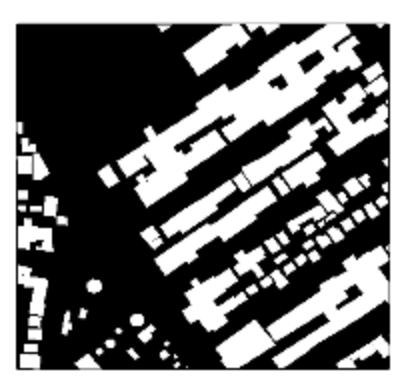
The above code snippet was recommended by a student based on a suggestion of our wonderful maintainer Sylvian Gruger in the forum, when Sylvian is trying to help students dealing with such segmentation dataset: https://forums.fast.ai/t/unet-binary-segmentation/29833/42. So far, it seems the best way to deal with such dataset.
However, when we trained a model using such a customized data block and ran `learn.export()`, `load_learner` would not work straight out of the box. There will be an Error:
```python
AttributeError: Can't get attribute 'SegItemListCustom' on <module '__main__'>
```
The problem can be easily solved by running the code containing the customized class and loading it into the memory before running `load_learner`. However, it in some sense breaks the nice and convenient design of `load_learner`, which is supposed to work out of the box with just the `export.pkl` file. Is there any way to make `learn.export` serialize the customized class and package it into the `export.pkl` file as well?
**Provide your installation details**
```text
=== Software ===
python : 3.6.8
fastai : 1.0.42
fastprogress : 0.1.18
torch : 1.0.0.dev20190121
nvidia driver : 396.44
torch cuda : 9.0.176 / is available
torch cudnn : 7401 / is enabled
=== Hardware ===
nvidia gpus : 1
torch devices : 1
- gpu0 : 16160MB | Tesla V100-SXM2-16GB
=== Environment ===
platform : Linux-4.9.0-8-amd64-x86_64-with-debian-9.6
distro : #1 SMP Debian 4.9.130-2 (2018-10-27)
conda env : Unknown
python : /opt/anaconda3/bin/python
sys.path : /opt/anaconda3/lib/python36.zip
/opt/anaconda3/lib/python3.6
/opt/anaconda3/lib/python3.6/lib-dynload
/opt/anaconda3/lib/python3.6/site-packages
/opt/anaconda3/lib/python3.6/site-packages/IPython/extensions
/home/jupyter/.ipython
Wed Jan 30 02:11:52 2019
+-----------------------------------------------------------------------------+
| NVIDIA-SMI 396.44 Driver Version: 396.44 |
|-------------------------------+----------------------+----------------------+
| GPU Name Persistence-M| Bus-Id Disp.A | Volatile Uncorr. ECC |
| Fan Temp Perf Pwr:Usage/Cap| Memory-Usage | GPU-Util Compute M. |
|===============================+======================+======================|
| 0 Tesla V100-SXM2... Off | 00000000:00:04.0 Off | 0 |
| N/A 35C P0 34W / 300W | 10MiB / 16160MiB | 0% Default |
+-------------------------------+----------------------+----------------------+
+-----------------------------------------------------------------------------+
| Processes: GPU Memory |
| GPU PID Type Process name Usage |
|=============================================================================|
| No running processes found |
+-----------------------------------------------------------------------------+
```
**To Reproduce**
Run `learn.export()` at the end of [this notebook](https://github.com/daveluo/zanzibar-aerial-mapping/blob/master/znz-segment-buildingfootprint-20190108-alldata.ipynb). Then, restart the kernel, execute the necessary imports and path variable definition, and run `load_learner(path_img)`.
**Expected behavior**
A fully trained learner should be loaded correctly from the `export.pkl` by `load_learner`. However, her e there will be an Attribute Error instead.
**Screenshots**

In the latter post, I feel like it is because my code containing the customized function as follow:
@faiv.TfmPixel @singledispatch
tfms1 = pad3d(padding=(50,20,50))
I rerun the definition of the function before export, but it does work as well.
Can any one help with this thanks very much.