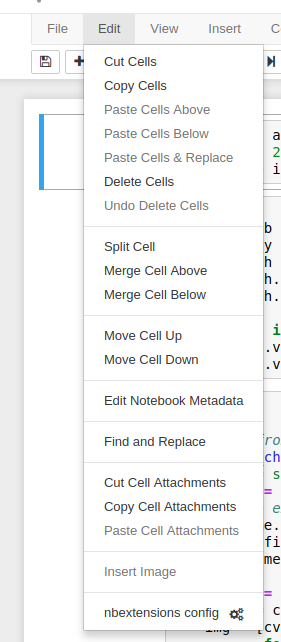
Jeremy’s jupyter notebook in his videos are collapsible to the headings. Does anyone know how to activate the setting on Jupyter Notebook?
1 Like
sorry everyone, it was a small typo for me in specifying Path
1 Like
Hello…
I am trying to plot the losses using interp.plot_top_losses(4, figsize=(15,11)) and it seems that fast.ai does not allow me to show the image name along with loss. It would have been of great help if we can have the image name also so that i can decide on further course of action on those images.
Thanks
@jeremy …Your guidance will be of great help on this please…
I tried to install fastai again in a new EC2 Instance. But I got an error when I install torchvision-nightly using “conda install -c fastai torchvision-nightly”. The error is:
Solving environment: failed
PackagesNotFoundError: The following packages are not available from current channels:
- torchvision-nightly
Current channels:
- https://conda.anaconda.org/fastai/linux-64
- https://conda.anaconda.org/fastai/noarch
- https://repo.anaconda.com/pkgs/main/linux-64
- https://repo.anaconda.com/pkgs/main/noarch
- https://repo.anaconda.com/pkgs/free/linux-64
- https://repo.anaconda.com/pkgs/free/noarch
- https://repo.anaconda.com/pkgs/r/linux-64
- https://repo.anaconda.com/pkgs/r/noarch
- https://repo.anaconda.com/pkgs/pro/linux-64
- https://repo.anaconda.com/pkgs/pro/noarch
To search for alternate channels that may provide the conda package you’re
looking for, navigate to
https://anaconda.org
and use the search bar at the top of the page.
Any idea?
1 Like
Your zip was seefood - but your path is seafood - that might be it?
I want to take a minute and thank everyone on the forums for not just sharing their amazing knowledge but also going out of their way to take out time from their lives to correct beginners like myself and and always answering the questions even if the answers are just a few google searches away.
Thank you for an amazing 2018.
Please continue inspiring us in 2019:
Thank you to the team @jeremy @rachel @sgugger @stas @lesscomfortable
Also to everyone on the forums who post about their amazing ideas. The list would be too long and I would annoy many people by tagging them.
I wish everyone on the fast.ai community a very happy new year!
May we continue to take on kaggle leaderboards and keep breaking SOTA on existing and new fields 
9 Likes
I have tried to plot the images from top losses through ImageCleaner class but it is quite slow. So I feel that showing image name with top losses will be much more easier and then we can take action on those particular images.
ds, idxs = DatasetFormatter().from_toplosses(learn50, ds_type=DatasetType.Valid)
ImageCleaner(ds, idxs,path)
Awesome! Can you guide me on how you deployed the model to production?
[[NOT COMPLETELY TOPIC RELATED]][[NEED SUGGESTIONS]]
What are the tools used to make a segmentation dataset? I want to create the masks from the raw images, and then feed those to a network. Came across U-net to go on about the segmentation problem. But how do I make the custom dataset from the raw images?
The task is to detect different types of red blood cells(different classes) in a microscopic image to give a count of each type of cell present and detect diseases if any. Basically it is a segmentation and classifcation problem.
Initally, the image is the be segmented and then patches are taken which is later fed to a network for classifcation. I am not confident in hand crafting the features myself(for segmentation)
@jeremy Also looking for your advice or suggestions if any.
Thanks!
I’d be careful of calling it production ready @cyberdroidmann - but I deployed to a public endpoint on Azure - and see my medium post https://medium.com/@lunchwithalens/deploying-my-fastai-predictor-to-microsoft-azure-c7e635d464a1 for more details. I have since migrated the App Service from P1V2 to a cheaper B2 service successfully - and I do work for Microsoft so I had some Azure credits. I think a B2 runs around $75/month - so if you just wanted to push it out and try it - then tear down it wouldn’t be that expensive. Let me know if there are questions the posting doesn’t address.
Found the answer in other thread.
from torchvision.models import densenet161
arch = densenet161
learn = create_cnn(data, arch, metrics=[accuracy])
3 Likes
In data containing Multiple Labels, how to effectively split the train and valid from csv? The problem is occurring where I split the data randomly and this generates an error where the Valid split contains labels which is not present in Training split.
I always first identify minority classes and then do the image aug for minority classes only and add them with my input data. Then apply train and test validation…Another approach can be to have two models and one is exclusively for minority class ones so that test and train split is more reasonable w.r.t other classes data
Help
I am trying to deploy my app on zeit, but it continues to give me errors. I am using the same code that is provided in the deployment guide

@jeremy Are there any plans to offer part 2 of the course to remote participants? (Thought of asking this on the forum since I might have missed the announcement.)
Thanks!
2 Likes
Were you able to resolve your issue? I am having the same problem on my local machine.
Hello All,
I am getting following error while apply TTA. It is a multi class image classification.
log_preds,y = learn50_dog_breed.TTA()
probs = np.mean(np.exp(log_preds),0)
================================
TypeError Traceback (most recent call last)
in ()
----> 1 probs = np.mean(np.exp(log_preds),0)
/mnt/disks/user/anaconda3/lib/python3.6/site-packages/numpy/core/fromnumeric.py in mean(a, axis, dtype, out, keepdims)
2952 pass
2953 else:
-> 2954 return mean(axis=axis, dtype=dtype, out=out, **kwargs)
2955
2956 return _methods._mean(a, axis=axis, dtype=dtype,
TypeError: mean() missing 3 required positional argument: “dim”, “keepdim”, “dtype”
Yes, Use the updated instruction at
1 Like