Awesome, thanks for the info Matt! Just what I needed
Had the same issue.
Run sudo apt-get update and then sudo apt-get install git
EDIT: sorry, I hadn’t noticed the question had already been answered
The notebook is constantly disconnecting and I have been running the code again and again. Any idea why this is happening?
1 Like
It seems there is a bit of gap at the end of lesson 1. Looking through the notes and watching the lecture, I found it easy to set everything up and fit a model on the cats and dogs redux dataset. But I don’t know where to go from here. Obviously I (ultimately) need to generate some predictions and somehow save them to CSV, but there are no clues in the materials, as far as I can see. Can anyone point me in the right direction? Thanks.
2 Likes
On generating some predictions:
Since you have a fit model, you can now use it to predict the labels of the test images. In the dogs_cats_redux notebook you’ll see a section called “Generate Predictions” which shows how to do this. Now, to make sure what Jeremy does in this section works, you’ll need to have followed the steps in the section called “Rearrange image files into their respective directories”.
On figuring out what to save to a CSV:
Once you have the labels (and their corresponding probabilities), you’ll submit them to Kaggle.
If you review the notebook I linked above and still experience a gap, we’ll likely need to see some of your code, so we can know exactly where you are. The best way to share the code for this case is to upload your notebook to GitHub and post a link, since GitHub automatically renders notebooks for easy viewing.
5 Likes
Totally had the same question as @heteroskedastic (I’m also a Tim!) and this was the perfect answer.
I didn’t see any reference to the redux notebook in the Lesson 1 wiki. Total lifesaver!
1 Like
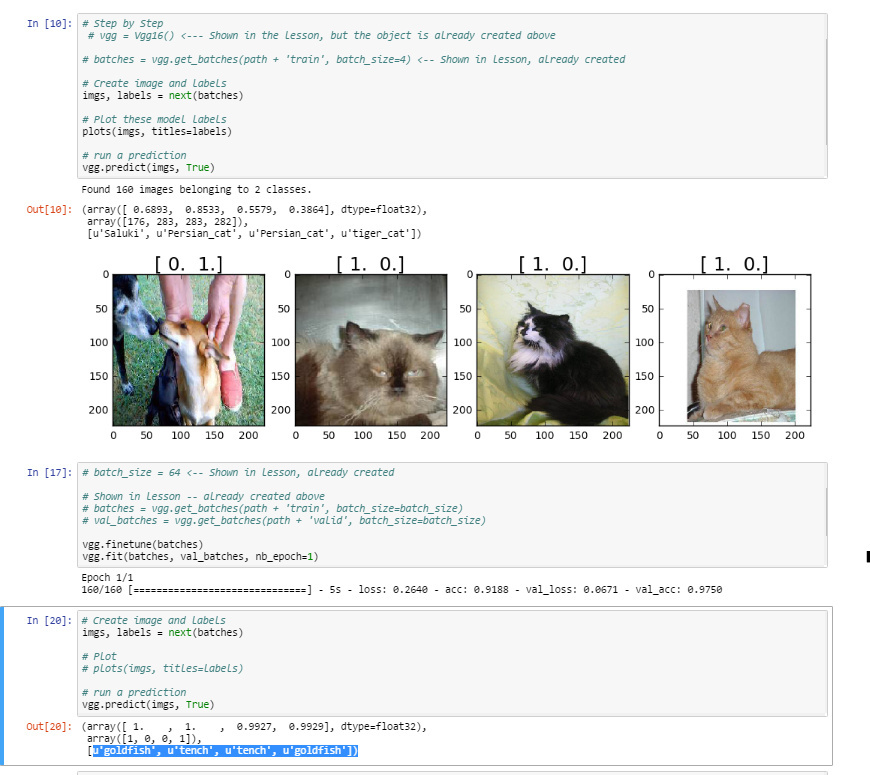
After finetuning the model and calling predict, somehow the classes are tench and goldfish. I suppose tench really corresponds to cats and goldfish to dogs. I wonder why finetune() did not automatically rename classes. Is there a way to fix it?
I had the same problem; your advice solved the issue.
Hi Jeremy,
Similar thread of thought as above… when I run the predict function on my fine tuned model, I am getting either ‘Tench’ or ‘GoldFish’ instead of ‘Dog’ or ‘Cat’. How would we get the labels to show based on our directory folders (dogs, cats) instead of the first two classes of the vgg model?
I ran through the lesson code as well, but it looks like you are calling the predict function [19]
vgg.predict(imgs, True)
before fine tuning[23] and fitting[24], which confuses me a little.
Here is a link to the gist of my code: Lesson1 Gist
See the highlighted bottom of the picture:
1 Like
Katya, I only have answer to question 1 because i have only done lecture 1:
The answer is yes, Its a good practice to have equal number of data in both folders. Since this is supervised learning. Here is a brief explanation of what is going on.
Here we aim at separating the dataset into training, cross validation and test dataset.
-Training set is to build your model
-Cross validation is to fine tune the model parameters on the unknown instances.
-Test set is to check for accuracy for the model.
Speaking of Validation set, There are two ways to pre-process and cleanup your data
- Cross validation: here data is divided into test set and validation set
- Using Fixed Validation set: here you divide your data set into folds such as 50, 25, 25% respectively or any suitable format.
here you train on the first fold and do model selection on the second part. Also it allows you to train your model on very small data set, verify it works, reduce the error rate, before running the model against the entire test data.
The downside of using cross-validation is that it requires about 5 times longer to train your model.
in the validation set, we categorized the data into dogs and cat, and got small samples to learn from. Clearly we are using Fixed Validation set to train, finetune and extract model parameters and features and run model and prediction on the test data set.
In order to have an equal distributed mean learning rate, cost function across both model. under the hood the implementation of VGG uses SVM(https://en.wikipedia.org/wiki/Support_vector_machine) to do the classification and regression analysis and calculate loss. Therefore you have to check if the number of samples for each category in the dataset is about equal across training, testing and cross-validation data.
Regarding the other questions please take a look at the original VGG paper https://arxiv.org/pdf/1409.1556v6.pdf and read the source code Vgg.py
I’m getting an error loading the lesson 1 notebook on my t2 server. The error reads:
Unreadable Notebook: /home/ubuntu/nbs/lesson1.ipynb NotJSONError('Notebook does not appear to be JSON: […])
I’ve tried deleting it and repeating the wget but no luck. I’m doing the wget to here:
“https://github.com/fastai/courses/blob/master/deeplearning1/nbs/lesson1.ipynb”
Any thoughts on why it is unreadable?
Anyone familiar with the css Jeremy is using for this notebooks?
1 Like
Hey @altmbr, it seems that you notebook file is corrupted, I mean, there is weird character breaking JSON format. There are more comments about this issue. In my case, I just used git to download the files.
1 Like
You might want to try downloading the file to your computer. Then you can upload it directly in jupyter. Theres a little ‘upload’ button in jupyter across from the home icon.
3 Likes
@carlosdeep, @Kradoc simple and sweet. Thanks :).
i had this problem maybe this link helps:
I am getting this error.
Cuda error: GpuElemwise node_1a4d88a71be2a74afabcec27cbb0fc5c_0 Sub: out of memory.
n_blocks=30 threads_per_block=256
Call: kernel_Sub_node_1a4d88a71be2a74afabcec27cbb0fc5c_0_Ccontiguous<<<n_blocks, threads_per_block>>>(numEls, local_dims[0], local_dims[1], local_dims[2], i0_data, local_str[0][0], local_str[0][1], local_str[0][2], i1_data, local_str[1][0], local_str[1][1], local_str[1][2], o0_data, local_ostr[0][0], local_ostr[0][1], local_ostr[0][2])
Apply node that caused the error: GpuElemwise{Sub}[(0, 0)](GpuFromHost.0, CudaNdarrayConstant{[[[[ 123.68 ]]
[[ 116.779]]
[[ 103.939]]]]})
Toposort index: 41
Inputs types: [CudaNdarrayType(float32, 4D), CudaNdarrayType(float32, (True, False, True, True))]
Inputs shapes: [(32, 3, 224, 224), (1, 3, 1, 1)]
Inputs strides: [(150528, 50176, 224, 1), (0, 1, 0, 0)]
Inputs values: [‘not shown’, CudaNdarray([[[[ 123.68 ]]
[[ 116.779]]
[[ 103.939]]]])]
Outputs clients: [[GpuSubtensor{::, ::int64}(GpuElemwise{Sub}[(0, 0)].0, Constant{-1})]]
HINT: Re-running with most Theano optimization disabled could give you a back-trace of when this node was created. This can be done with by setting the Theano flag ‘optimizer=fast_compile’. If that does not work, Theano optimizations can be disabled with ‘optimizer=None’.
HINT: Use the Theano flag ‘exception_verbosity=high’ for a debugprint and storage map footprint of this apply node.
@altmbr if you wget from git directly on the file it will download the html page being displayed and not the file you want. On the left/top side you have three buttons: Raw Blame History, click on Raw and wget the file you get, in your case it should be:
https://raw.githubusercontent.com/fastai/courses/master/deeplearning1/nbs/lesson1.ipynb
1 Like
@gauravgupta your GPU is running out of memory. Make sure you don’t have any other proccess running: on the bash console, run : nvidia-smi -l 1
to get a monitor of the gpu usage. If no other proccess is running try a smaller batch size…
2 Likes
@melissa.fabros if you want to get predictions on the whole train folder it is easier to use predict_generator as used in jeremy’s vgg.test function than using just .predict .
regarding the 4 hours training it is not normal, are you using the gpu?