nbdime: Selective Diff/Merge Tool for jupyter notebooks
I also need to share very useful tips about nbdime which is very useful for working with jupyter notebooks.
Install it first:
pip install -U nbdime
it should automatically configure it for jupyter notebook. If something doesn’t work, see installation.
Then put the following into ~/.jupyter/nbdime_config.json:
{
  "Extension": {
    "source": true,
    "details": false,
    "outputs": false,
    "metadata": false
  },

  "NbDiff": {
    "source": true,
    "details": false,
    "outputs": false,
    "metadata": false
  },

  "NbDiffDriver": {
    "source": true,
    "details": false,
    "outputs": false,
    "metadata": false
  },

  "NbMergeDriver": {
    "source": true,
    "details": false,
    "outputs": false,
    "metadata": false
  },

  "dummy": {}
}
Change outputs value to true if you care to see outputs diffs too.
Now when you do:
git diff
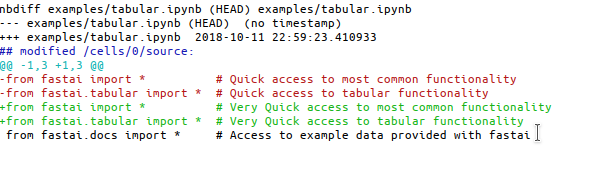
Instead of getting a very noisy and hard to parse normal diff:
--- a/examples/tabular.ipynb
+++ b/examples/tabular.ipynb
@@ -2,12 +2,12 @@
  "cells": [
   {
    "cell_type": "code",
-   "execution_count": null,
+   "execution_count": 1,
    "metadata": {},
    "outputs": [],
    "source": [
-    "from fastai import *          # Quick access to most common functionality\n",
-    "from fastai.tabular import *  # Quick access to tabular functionality\n",
+    "from fastai import *          # Very Quick access to most common functionality\n",
+    "from fastai.tabular import *  # Very Quick access to tabular functionality\n",
     "from fastai.docs import *     # Access to example data provided with fastai"
    ]
   },
You will get this sweetness:
The second feature I like is that now your notebook has a button: [nbdiff] along all the tools and it’ll show you the diff right in your browser!

And did I say that it does notebook merging too! Whoah! Use the setting above and it’ll ignore any noise when merging (i.e. metadata, execution_count, etc.), and only merge code cells! Of course you can adjust the configuration to suite your needs.
For the full docs see its website.