Rebuilt my image with the following requirements.txt (I moved pip installing the CPU friendly torch/torchvision into here vs. doing it in the Dockerfile:
aiohttp==3.6.0
aiofiles==0.4.0
Click==7.0
fastapi==0.42.0
gunicorn==19.9.0
h11==0.8.1
httptools==0.0.13
joblib==0.14.0
pydantic==0.32.2
python-multipart==0.0.5
starlette==0.12.9
uvicorn==0.10.0
uvloop==0.13.0
websockets==8.0.2

--find-links https://download.pytorch.org/whl/torch_stable.html
torch==1.3.1+cpu
torchvision==0.4.2+cpu

scikit-learn==0.21.3
fastai==1.0.52
Docker Image size = 2.07GB.
It seems that how you specify your layers in the Dockerfile is important.
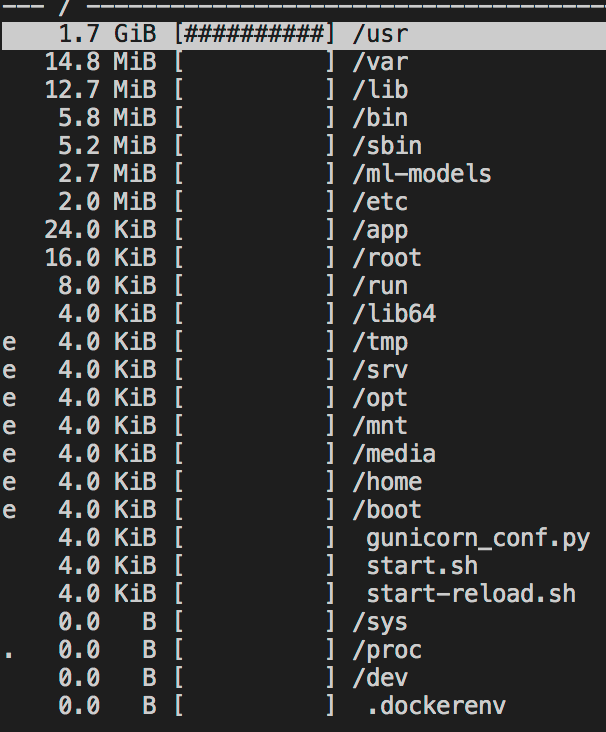
Using the ncdu tool (thanks for that btw jeremy!) I notice the following:
-
/root/.cache/pip = 249.3MB (247.9 of this is under the /http folder). Question: Can I remove this from the image? If so, that give me back 250MB which would be nice.
-
/usr/local/lib/python3.7/site-packages = 842.7Mb.
torchis the biggest package at 341.7Mb and outside of that, everything looks reasonable withscipy, numpy, spacy, pandasadding collectively another 231Mbs.
So aside from being able to remove the /root/.cache files, it doesn’t look like there is much else I can do to reduce the file size. So another question: What is a reasonable image size of an inference only docker image? I know the answer is probably app-specific, but would be great to hear what other folks are seeing and to know if I’m in the ballpark of it looking right or off.
EDIT:
Here is my latest Dockerfile if anyone is interested:
FROM tiangolo/uvicorn-gunicorn-fastapi:python3.7

ENV MODULE_NAME=app

RUN apt-get update && apt-get install -y ncdu \
    && rm -rf /var/lib/apt/lists/*

COPY ./app/api/requirements.txt /app
RUN pip install --upgrade pip
RUN pip install --upgrade -r requirements.txt
RUN rm -rf /root/.cache

COPY ./app/api /app
re: Question: *Can I remove /root/.cache/pip from the image? Seems like the answer is “yes” (see Dockerfile below) … and doing so brings the image to ~ 2.05GB.
Here is a screenshot of what ncdu tells me after making these changes: